
Last night, I had the pleasure (and chaos) of presenting at the Tri-State SharePoint User Group (TSSPUG)—virtually, because let’s be real, nothing screams “SharePoint admin life” like juggling 10 tabs, two email accounts, and a Teams meeting from your kitchen counter.
The topic? How I’ve been unsucking SharePoint lately. Specifically, I took folks behind the scenes of what it really looks like to roll out SharePoint Advanced Management (SAM) and the new Brand Center across a sprawling enterprise environment.
Spoiler alert: not everything worked as advertised.
The TLDR (because ain’t nobody got time for governance jargon)
Copilot readiness? It’s just governance with lipstick—don’t worry, I’ve ranted about it already. SAM is finally “free,” but like a free puppy… it still makes a mess if you’re not paying attention. And Brand Center? It’s cute, it’s centralized, and it still can’t stop Karen from uploading her own version of the logo to every site collection she touches.
SharePoint Advanced Management (SAM): the good, the clunky, and the quietly powerful
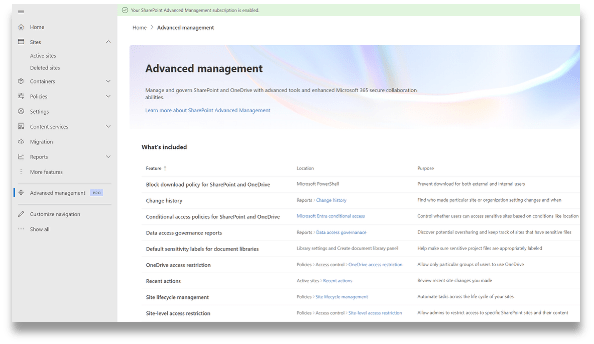
Let’s talk SAM. It’s now bundled into Microsoft 365 E3/E5 plans, which means no more awkward “hey boss, can I get another SKU just to clean up site sprawl?” conversations.
What’s actually useful:
- Site lifecycle automation: Set it, forget it, and stop waking up wondering if a closed out project site is still open to half of HR and three consultants.
- External sharing reports: Finally see which links are one click away from going viral in the worst way.
- Change History: Surprisingly seamless and genuinely helpful for untangling who changed what, when, and why someone thought it was a good idea.
- Still experimenting: I’m currently tinkering with the idea of removing the “Everyone Except External Users” (EEEU) group entirely. It’s terrifying—because let’s be honest, that group has been the duct tape of permissions for years—and I still don’t know what the true impact will be.
But let’s be honest: SAM is still a button-heavy mess. You’ll be clicking, toggling, and second-guessing your life choices as you hunt through menus scattered across the admin center like confetti after a governance parade. I think some of them are intuitive, but honestly I’ve stopped trusting my own instincts at this point.
Bonus detour: Viva Learning (Basic) deserves more love
Before diving into Brand Center, I took a quick detour to spotlight one of Microsoft 365’s most ignored apps: Viva Learning (Basic).
This app has been sitting quietly in everyone’s tenant, collecting dust like that forgotten training binder on a top shelf. But it actually has a lot of potential—especially if you’re trying to foster a learning culture without buying more licensing.
I covered this in more depth at the Cincinnati M365 User Group last October—check out the full recap here.
TLDR: it’s there, it’s free-ish, and honestly? If more people knew it existed, I wouldn’t have to keep yelling about it in user groups like a digital learning evangelist with trust issues.
Brand Center: pretty on the outside, picky on the inside

Brand Center was hyped as the fix for our decades-long war with inconsistent logos, rogue fonts, and the eternal “can you send me the right PowerPoint template?” Teams chat.
And you know what? It mostly delivers.
What it gets right:
- ✅ Centralizes your branding across SharePoint, PowerPoint, Word, and even Clipchamp
- ✅ Copilot respects (most of) your branding rules—finally, AI with taste
- ✅ CDN-backed delivery makes everything feel snappier
- ✅ No more zip folders called “Logos-Final-Final-Revised.zip” floating around your org
But it’s not all pastel gradients and productivity:
- ❌ No fallback or enforcement—if a site opts out, it just… opts out
- ❌ Governance is still DIY—you can suggest a brand, but you can’t make people use it
- ❌ Gets real weird in hybrid and federated orgs. Like “why is this logo purple over here but fine everywhere else?” weird. Ask me how many hours I’ve lost to that rabbit hole. (No, really—ask me. I dare you.)
In short: Brand Center is a much-needed upgrade, but it’s not a one-click solution. You still need a plan, a champion, and someone with veto power over requests to use Comic Sans in your quarterly report.
Real talk takeaways
Thinking about rolling out SAM or Brand Center? Here’s what I’d scribble on a Post-it and slap on your monitor:
- Inventory is everything. If you don’t know what you have, you’re not managing—you’re just guessing with better tools.
- Lifecycle rules = Copilot prep. If your content is a mess, AI will just deliver that mess faster (and in bold).
- Start ugly. Don’t wait for the perfect governance framework. Launch, learn, and tweak.
- Structure before style. Organize your hubs, align your ownership model—then you can worry about fonts and logos.
- Question the defaults. Like EEEU. Just because it’s always been there doesn’t mean it should be.
Final thoughts (and cats)
This session was a blast to deliver and if you attended you may have even heard my cat Poes making a brief (hungry) appearance on the background. Huge thanks to Jason Rivera and the Tri-State SharePoint User Group (TSSPUG) for hosting, and to everyone who showed up with spicy questions, lived-in horror stories, and a shared desire to make our intranets just a little less painful.
If you’re knee-deep in SAM, wrestling with the Brand Center, or finally trying to retire your “intranet2-temp” site from 2016—I see you.
And if your header font is Papyrus? I’m going to pretend I didn’t see it.
Let’s connect: @UnsuckM365
 Unsuck Microsoft365
[…] you absolutely must use custom fonts, make sure they’re fully web-safe, embedded properly through SharePoint’s Brand Center or theme management, and tested extensively. You’re not just designing for your marketing […]
LikeLike