
We don’t always mean to send the wrong signal—but sometimes, even a well-meaning message at the wrong time can do just that.
Whether you’re catching up on work late at night, prepping for the week on a Sunday, or just powering through your inbox after hours, hitting “send” in the moment can unintentionally create pressure for someone else to respond. That’s where Schedule Send in Outlook and Microsoft Teams comes in—not just as a productivity feature, but as a wellness tool.
Why timing matters
We’re living in a world that’s always on. Different time zones. Pings at 10pm. “Quick questions” on weekends. Late-night Teams chats that aren’t emergencies but feel urgent anyway. These things add up, especially for your team’s mental load.
Asynchronous communication is a gift – let’s treat it like one. The ability to time our messages more intentionally respects personal boundaries, accommodates time zones, and reduces the stress of feeling like you need to “just check in real quick” outside work hours.
How to use schedule send
Here’s how to use the feature in both tools:
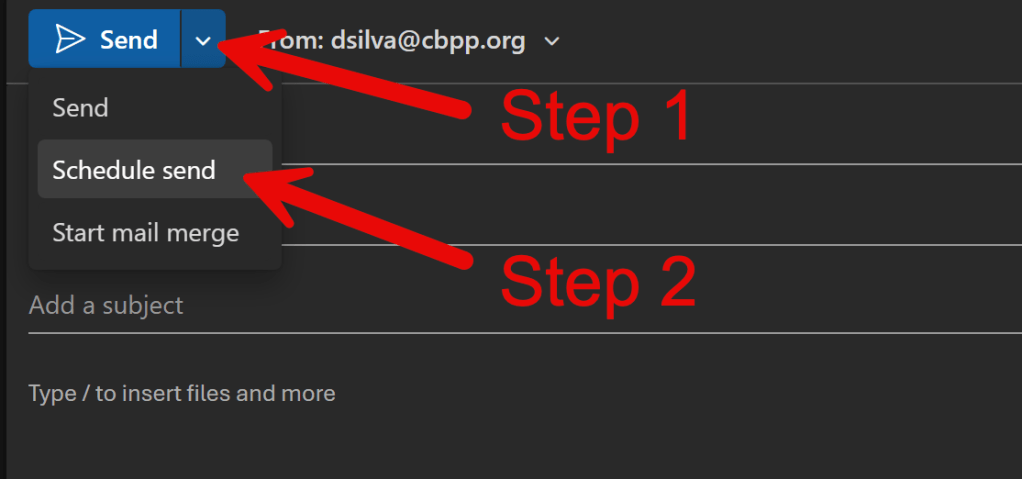
In Outlook: After composing your message, click the drop down next to “Send”, choose “Schedule send”, then pick your desired date and time.
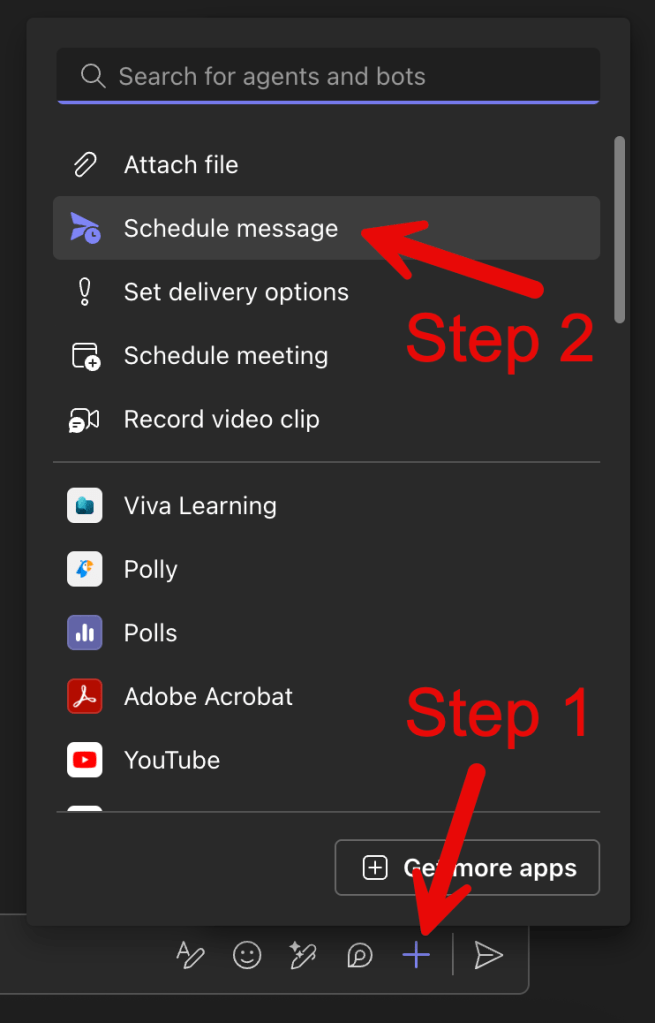
In Microsoft Teams: While slightly trickier, the option is also there. After writing your chat message, click the small arrow next to the send icon, select “Schedule send”, then choose your preferred time. Just make sure you are already in a conversation with the person first, otherwise the option will not be there.
That’s it. No plug-ins. No special settings. Just built-in respect for someone else’s time.
Real-world use cases
- You’re working late, but your team doesn’t need to.
- You’re planning on a Sunday afternoon but want your message to land Monday morning.
- You manage or collaborate with folks in different time zones.
- You’re leading by example and want to normalize setting boundaries.
Creating a culture of healthy communication
The tools are helpful, but the culture is what really matters. Encourage your team to use schedule send and avoid messaging outside of defined working hours unless it’s urgent.
Pro tip: add a note in your signature or Teams status like
“I work flexibly and may send messages outside of standard hours. No response expected outside of yours.”
It’s a small gesture that goes a long way.
Seen this movie before…
Another time—many years before the pandemic, mind you (so no, this isn’t about you)—a colleague would email the whole team (and the manager, OF COURSE) at 11pm… sometimes even 1am. The messages were often completely meaningless, but it didn’t matter.
The boss would always applaud her: “What a hard-working example for the team!”
Needless to say, she burned out faster than it took me to write this post. But that was pre-pandemic. Things have changed now. Or have they?
To protect yourself and others from falling into that trap, consider these:
- Set working hours in Outlook and Teams to reduce non-essential pings.
- Use Viva Insights to enable quiet time or focus mode.
- Consider status messages to signal your availability expectations.
My take (like you thought that was not coming 🤣)
I’ll be honest—I didn’t always think this way.
A former manager once was adamant that I only send messages during business hours. Being a consultant, that wasn’t always possible, and I used to tell myself, “It’s not my problem they’re checking their email after hours.”
Bad, bad, bad, Diego.
I was clearly lacking empathy at the time, and while I’d like to think I’ve (mostly) changed, that experience really stuck with me. Later on, I found out that a single “ding” – whether it came from someone forgetting to silence their phone or leaving their laptop open – could send them spiraling into anxiety. Over what?
Because Person A didn’t have access to PotluckParty.docx?
That could have waited. And it should have.
These days, I use schedule send not just to be courteous, but to help shape a healthier culture – one where being productive doesn’t come at the cost of someone else’s peace. Where intentional habits are part of how we lead. I’ll be the first to admit I don’t always get it right, but I’m doing my best. And that effort matters.
Use the tools. Protect the peace. Normalize boundaries.
That’s the spirit of #WellnessWednesday
To finish off this post – be honest – have you ever scheduled a message just to look like you were working early? 😏 Or had someone’s midnight ping ruin your evening? Share your “oh no they didn’t” moment in the comments.
 Unsuck Microsoft365