
Sometimes Microsoft ships an update that makes me want to slow clap. The new Content Pane is one of those moments. It’s the sidekick you didn’t know you needed—until you spent one too many hours digging through toolbars trying to add a file or a web part that should’ve been two clicks away.
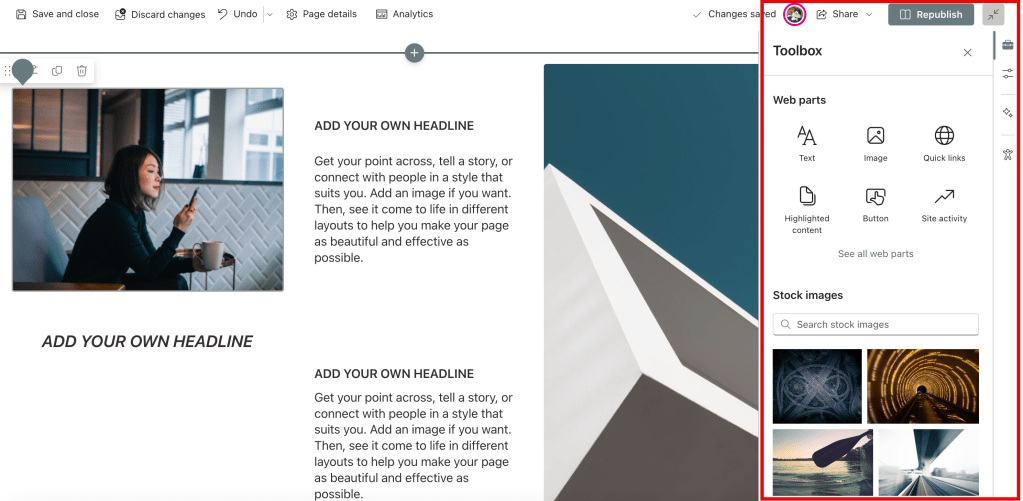
This update, highlighted in the October 2024 SharePoint Roadmap Pitstop, quietly changes the game. It brings a slick, docked content panel into SharePoint’s editing interface so you can access documents, media, web parts, and more—without breaking flow or needing to summon the ribbon gods.
Translation: fewer clicks, more clarity, no more opening extra windows or muttering under your breath because the image gallery decided to hide again.
What’s in it?
- Quick access to recent documents and media
- Previews right inside the pane (yes please)
- Easy drag-and-drop into your SharePoint page layout
- Built-in filters and file type sorting that actually make sense
Why this unsucks editing in SharePoint
If you’ve ever trained content authors who were new to SharePoint, you know how many weird little steps it took to “just add a PDF” or “put in a video.” This simplifies the whole experience. It feels modern. It respects people’s time. It’s the kind of feature that saves help desk tickets before they happen.
And if you’re a control freak (like me) who curates templates and wants consistency across pages? The content pane supports smarter workflows without forcing your users into Power User status just to get things done.
The M365 community gets it
I’ve already seen folks across the M365 community celebrating this one. From intranet designers to casual content contributors, the reactions are clear: the Content Pane doesn’t just improve usability—it helps SharePoint feel like it’s keeping pace with actual user expectations.
Keep an eye on how this evolves. I wouldn’t be surprised if we see even tighter integrations with Microsoft Stream, Loop components, or Viva Connections soon.
So if you haven’t played with the new Content Pane yet, this is your sign. Fire up a modern page, take it for a spin, and unsuck your editing life one click at a time.
Learn more: Introducing the Content Pane – Official Blog Post
 Unsuck Microsoft365