
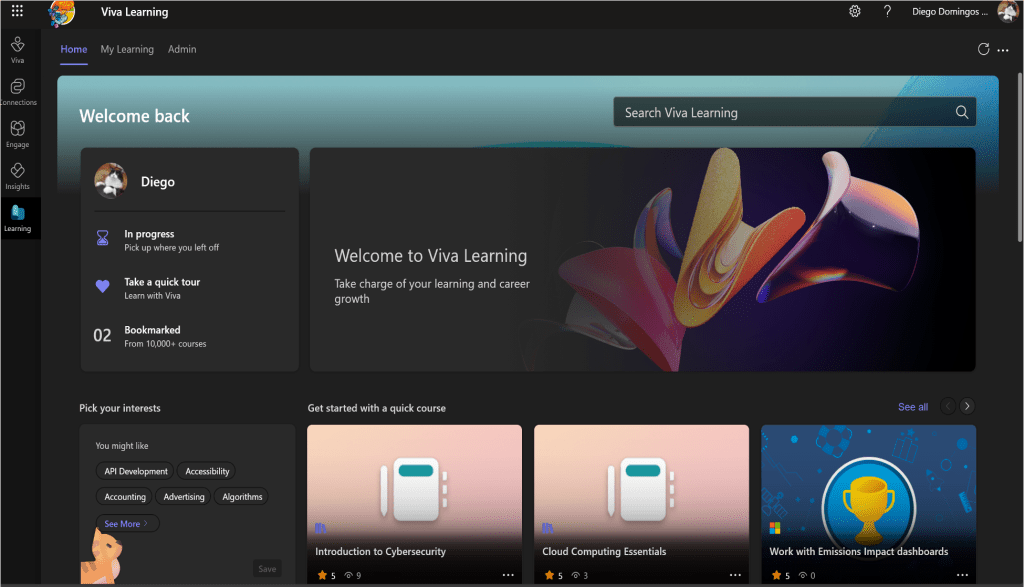
If your org has Microsoft 365 and Teams, there’s a good chance Viva Learning is sitting in your tenant collecting dust. It’s time to change that. In my session for the Cinci M365 User Group, we went through how Viva Learning integrates with Teams and SharePoint to actually make internal training usable—and dare I say, enjoyable.
This was an intro session open to all levels, and everything I covered is possible using the free tier of Viva Learning. No upsells, no add-ons, no hidden costs.
Why Viva Learning Actually Matters
Internal training usually means a bunch of out-of-date PDFs hidden somewhere on SharePoint. Viva Learning changes that by surfacing training content directly inside the tools people are already using—Teams and SharePoint. That means you can recommend a course in a chat, pin learning to a channel, and share onboarding docs in a way that feels natural.
Built-in providers include:
- LinkedIn Learning (SSO-supported if you’ve got the license)
- Microsoft Learn
- Microsoft Training Services
- Your own SharePoint content
It personalizes the learning experience, allows sharing and recommendations, and doesn’t require users to leave their flow. It’s low-friction, high-impact stuff.
Free vs Premium: Know the Difference
Here’s what you’re working with out of the box:
Viva Learning (Basic)
- Included in Microsoft 365—no extra licenses required
- Surfaces learning content from four built-in providers
- Limited reporting (individual export only for now, bulk export on the roadmap)
Viva Learning (Premium)
- $4/user/month (or $12/user/month with Viva Suite)
- Adds LMS connections, assignments, reporting
- Still requires separate licensing for third-party content like Pluralsight or edX
- Needs HR and L&D involvement to roll out at scale
But here’s the punchline: You don’t need Premium to make Viva Learning useful. The free tier works great for internal IT training, process walkthroughs, and onboarding.
Using Viva Learning in the Real World
During the session, I walked through how you can:
- Embed a training PDF or walkthrough hosted on SharePoint into a Teams tab
- Share a LinkedIn Learning course inside a chat or team channel
- Recommend learning content and guide your team through onboarding
Where It Shines: Internal IT Training
If you’re responsible for internal tech training, process guides, or onboarding—this is your tool. You don’t need a full-blown LMS. Just drop your training into a SharePoint doc library and let Viva Learning surface it across Teams.
It’s a cleaner, more intuitive way to get people to engage with training without the hassle of custom tools or duplicate platforms.
Tips for Making It Work
- Pin Viva Learning in the Teams app bar
- Use SharePoint to manage and organize your training content
- Encourage managers to recommend content during 1:1s
- Enable LinkedIn Learning SSO if you already have it licensed
What Admins and Managers Should Know
The free version doesn’t give you fancy dashboards, but it does the job for tracking who’s completed what (on a per-user basis). You can still leverage SharePoint permissions, integrate existing content, and manage learning journeys organically.
If you eventually need org-wide reporting or LMS integrations, Premium is there. But you can get a ton of value now without spending another dime.
Final Thoughts
Viva Learning is one of the better-kept secrets in Microsoft 365. It’s already in your tenant, it plays well with Teams and SharePoint, and it doesn’t require a budget approval to get started. It’s especially handy for IT pros, trainers, and anyone tired of emailing out yet another onboarding checklist that no one reads.
Thanks again to everyone who joined the session. And if you want to keep the conversation going, you know where to find me.
Until next time, keep it simple. Keep it useful. And for the love of productivity, let’s stop burying training PDFs in forgotten folders.
 Unsuck Microsoft365
[…] I covered this in more depth at the Cincinnati M365 User Group last October—check out the full recap here. […]
LikeLike