
For quite some time now I am being asked about governance of Microsoft Loop and what to do particularly if the owner of a Loop Workspace leaves the organization. Well, it finally looks like progress is being made.
First off, Microsoft Loop is composed of Components and Workspaces. Loop Components can be stored in varying places according to where they are created. If they are created in a Teams chat, Outlook email, Word for the web, or Whiteboard, each component will be stored as an individual file in OneDrive. If they are created in a Workspace, the components will also live within that workspace. And here is an amazing blog post from SharePoint Maven explaining all of that in detail. And if you are all tangled up in a Loop (pun intended), here is a great post by Jay Leask on how to delete a Loop Component.
Loop Workspaces in the other hand, are more structured and while not a direct replacement for OneNote, they work in a very similar fashion. OneNote organizes its contents in Notebooks (the actual OneNote file), Sections, and Pages. Loop Workspaces are composed of the Workspaces themselves, and those can contain Links (just regular hyperlinks) and Pages. Those can also contain Loop Components, but when the components are created in a page, they will live in that Workspace. Phew! I hope that was an easy enough explanation.
So where are Loop Workspaces actually stored?
Confused yet? Don’t worry, it gets a bit messier. Whenever a new Loop Workspace is created, a new SharePoint Embedded container gets created on the back end. In very simple terms, SharePoint Embedded is an API only solution – basically a site without all the libraries, pages, and all the extra content. These containers simplify a lot the work of developers creating SharePoint sites that won’t ever be used as an actual website, and they don’t even get displayed within the list of SharePoint sites in Admin Center. Information from these containers also do not get aggregated in the same way that SharePoint sites behave.
As any new feature, access to SharePoint Embedded containers was initially only available via PowerShell. However, in February 2024, the ability of managing SharePoint embedded containers from Admin Center was finally announced (MC715694). Fast forward to June 2024, and these containers are finally being displayed in Admin Center. So here is what you need to know to prepare.
New Admin Role: SharePoint Embedded Administrator
In order to see these containers, a new role was created, called SharePoint Embedded Administrator. This role will allow users to manage SharePoint Embedded containers but NOT SharePoint Online sites. This is great, as it separates sites from containers, thus allowing more freedom for developers to create containers while maintaining additional security for SharePoint content. Once enabled (and given the feature has been rolled out to your tenant), your admin center will now look like this:
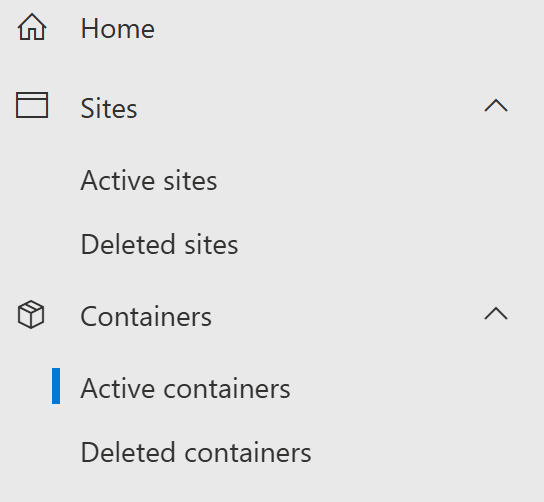
From the Active containers list, you will see all your SharePoint Embedded containers, and the Loop Workspaces will be marked “Loop” under application name.

So, what can I really do in Admin Center?
For now, not a whole lot. You can delete containers, export a list of them (but not export the containers themselves), and figure out who their owners are but that is pretty much where it ends. Clicking on an individual container will display some additional information about its owner and membership but there is nothing more admins can do at this point.
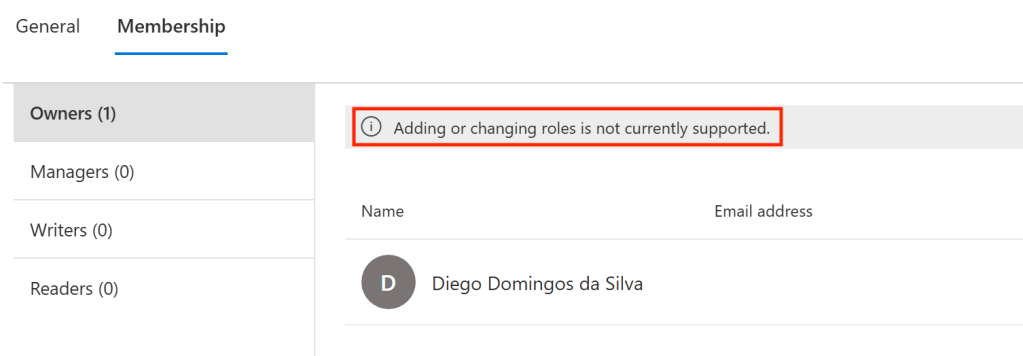
Another issue with SharePoint Embedded containers is that third party tools have not yet been updated to manage them, so the only option at this point is still PowerShell.
Stay tuned, as I will update this post with more features as they are released!
 Unsuck Microsoft365